Lesson 3: Organize and Refine Digital Workspace

Updated: Apr 26
Estimated Time: 35-40 minutes
Organize and refine your digital files and folders
Lesson Overview:
In this lesson, you will evaluate and improve improve your digital workspace by using effective organization strategies. You will review your current file organization system and apply strategies for folder organization and file naming.
This activity will help you create a structured digital workspace that supports efficient workflow and makes it easier to locate assignments and course materials.

Before You Begin:
Before organizing your workspace, review what effective digital organization looks like:
Files are grouped into clear, logical folders
Folder names are specific and easy to understand
Files are named consistently
Materials are easy to locate
What You Will Do:
In this activity, you will:
Review examples of an organized digital workspace
Evaluate your current digital workspace using a structured rubric
Apply strategies to reorganize or refine your folders and file names.
Provide a screenshot or description of your updated digital workspace.
Steps for This Activity:
The example below shows how an organized digital workspsace might look in a university course setting.
Step 1: Review an example of an Organized Digital Workspace:
Look at the example below to see how digital folders and files can be organized effectively.

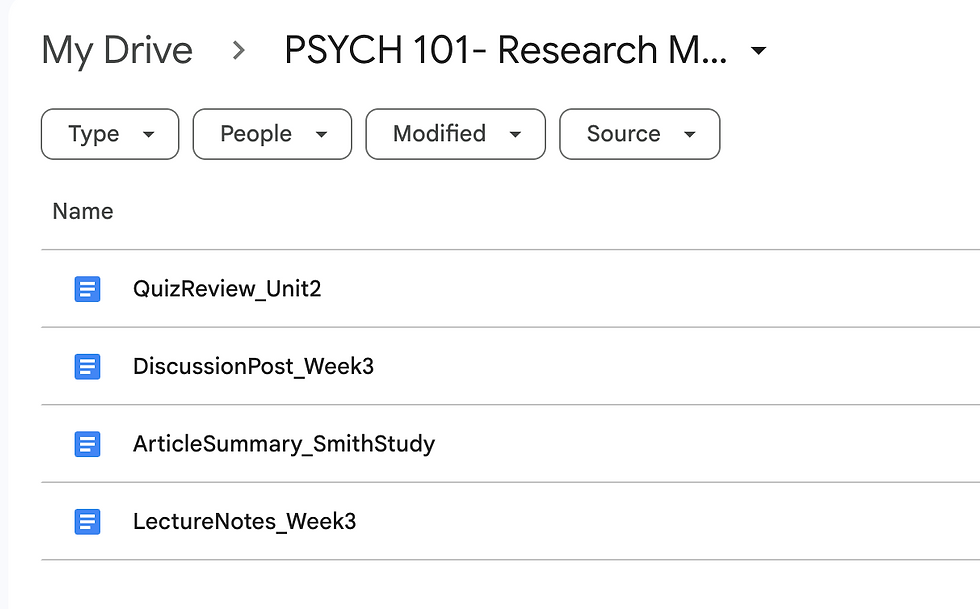

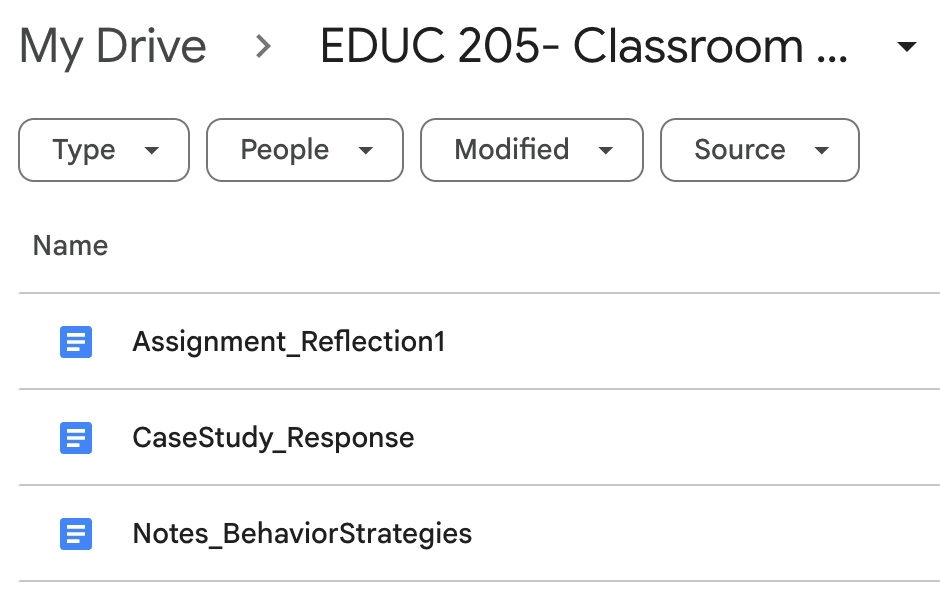
Example Comparison:
Strong Examples:
Folder: PSYCH 101- Research Methods
Lecture Notes_Week 3
Article Summary_SmithStudy
Discussion Post_Week 3
Quiz Review_Unit 2
Folder: EDUC 205- Classroom Management
Notes_BehaviorStrategies
CaseStudy_Response
Assignment_Reflection1
Needs Improvement:
Folder: Psychology
Notes
Final
Week 1
Doc1
Stuff
These examples makes it difficult to locate specific materials because file names are vague and inconsistent.
Step 2: Review the Organization Criteria:
Use the rubric below to understand the critera for effective folder and file naming.
Digital Workspace Organization Rubric
Criteria | Meets Expectations | Developing | Needs Improvement |
Folder Organization | Folders are clearly organized into logical groups that support ease of navigation | Some organization is present, but structure may be unclear or inconsistent | Folders are disorganized or lack a clear structure |
File Naming | File names are specific, consistent, and clearly describe the content | File names are somewhat clear but may be inconsistent or lack detail | File names are vague, inconsistent or unclear |
Ease of Navigation | Files and folders are easy to locate quickly and efficiently | Some materials are easy to find, but organization may slow navigation | It is difficult to locate files or understand the structure |
Application of Organization Strategies | Organization reflects the use of clear strategies (grouping, naming, consistency). | Some strategies are applied but not consistently | Little or no evidence of organization strategies |
Step 3: Evaluate Your Current Digital Workspace:
Compare your current folders and files to the rubric.
Think About:
How your folders are organized
How your files are named
How easy it is to locate what you need
Step 4: Organize or Refine Your Workspace:
Reorganize or refine your folders and file names as needed.
Step 5: Check Your Organization
Use this checklist before submitting:
My folders are clearly labeled
My file names are specific and consistent
I can easily find what I need
My organization system supports my learning
Before submitting, make sure your workspace reflects organization strategies from this lesson.
Step 6: Submit Your Work
Submit one of the following:
A screenshot of your updated digital workspace
A brief description of how you reorganized your folders and files.
When you are ready, navigate to the Learning Materials page to submit your work.
Submission Guidelines:
Your submission should clearly show your folder structure and file names
Make sure your organization changes ar visible
Why This Activity Matters
Organizing your digital workspace helps manage course materials more efficiently and locate important files quickly. Improving your digital organization practices can support productivity and success in online learning environments.


Comments